

How to add a contact form to a static website: every option compared
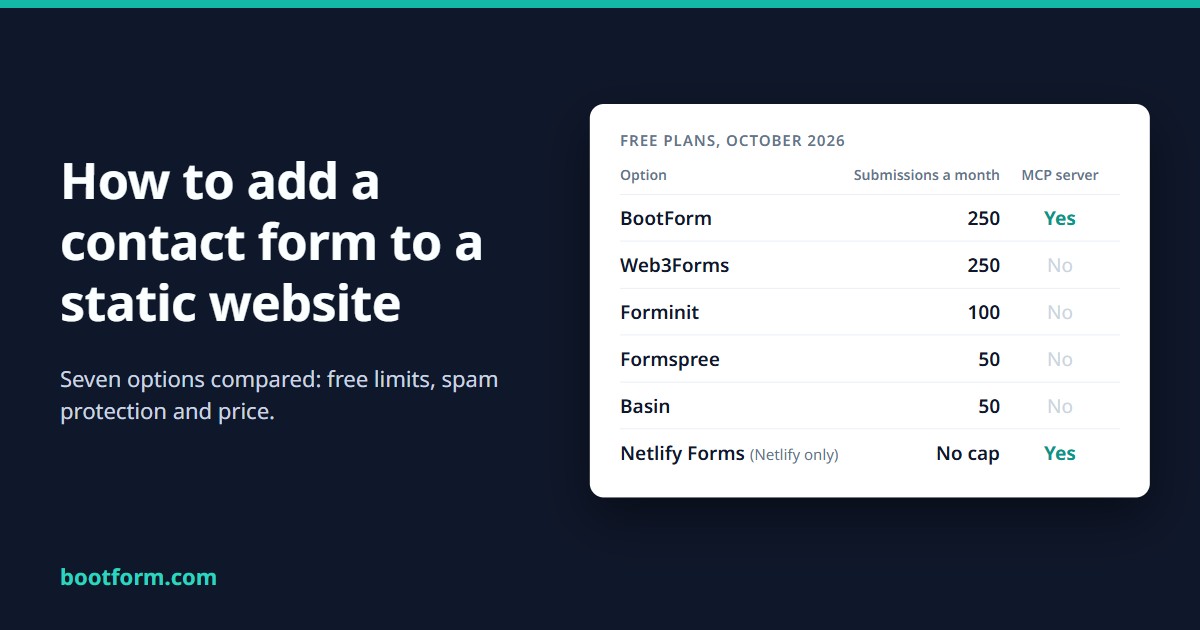
In short: a static site can't receive a form by itself, so the form posts to a form backend that emails you the message. On any host, BootForm and Web3Forms give the most free submissions, 250 a month. BootForm also includes Cloudflare Turnstile, Discord notifications and an MCP server for AI coding agents on its free plan, and you don't need an account to start. If your site is already on Netlify, Netlify Forms is free with no submission cap. Forminit and Basin accept file uploads for free. Or write a small function yourself, if you want full control and don't mind looking after it.
Every number below comes from each provider's own pricing page or docs, checked on 23 October 2026. Prices change, so check the provider's page before you commit. And yes, we make one of these (BootForm), so we've tried hard to say where each of the others is the better choice.
Why can't a static site send a form by itself?
A static site is a folder of HTML files. Nothing runs on the server when a visitor presses "Send", so there's nowhere for the message to go. That's what makes static sites fast, cheap and hard to break, and it's also the one thing they can't do alone.
The fix is the same in every option here. Your form's action points at someone else's server, which receives the POST, filters out spam, and passes the message on: usually by email, sometimes to Slack, Discord, a webhook or a spreadsheet. The form itself stays plain HTML:
<form action="https://forms.example.com/your-form-id" method="POST">
  <input name="email" type="email" required>
  <textarea name="message" required></textarea>
  <button type="submit">Send</button>
</form>
What differs is how many messages you get for free, how spam is stopped, whether files can be attached, and whether you need an account (or a particular host) before it works.
The comparison at a glance
Free plans first, since that's where most small sites stay:
| Option | Free a month | Free forms | Free spam protection | Free uploads | MCP for AI agents | First paid plan |
|---|---|---|---|---|---|---|
| BootForm | 250 | Unlimited (fair use) | Honeypot, Turnstile, spam folder | No | Yes, every plan | $8/mo, 2,500 |
| Web3Forms | 250 | Unlimited | Spam filter, hCaptcha, honeypot (Turnstile: paid only) | No | No | $12.42/mo, 10,000 |
| Forminit | 100 | 1 | Filters, Turnstile, reCAPTCHA, hCaptcha | 100 MB | No | $15.83/mo, 5,000 |
| Formspree | 50 | Unlimited | ML filter, reCAPTCHA | No | No | $10/mo, 200 |
| Basin | 50 | 1 | Filtering, reCAPTCHA, hCaptcha, Turnstile | 100 MB | Not yet (rolling out on paid plans) | $12.50/mo, 250 |
| Netlify Forms | No cap (Netlify sites only) | Per site | Akismet, honeypot, reCAPTCHA | 8 MB per submission | Netlify's, site-wide | Netlify Personal, $9/mo |
| Your own function | Up to you | Up to you | Up to you | Up to you | Up to you | About $5 to $25/mo |
Paid prices are per month, billed yearly where there is a yearly price, with the submissions a month they include. Turnstile means Cloudflare Turnstile with your own (free) keys. Forminit was formerly called Getform.
Once you outgrow the free plan, the price per message varies a lot more than the headline prices suggest. Here are the first paid plans, cheapest first, paid yearly:
| First paid plan | Per month | Included | Cost per 1,000 |
|---|---|---|---|
| BootForm Starter | $8.00 | 2,500 | $3.20 |
| Formspree Personal | $10.00 | 200 | $50.00 |
| Web3Forms Pro | $12.42 | 10,000 | $1.24 |
| Basin Starter | $12.50 | 250 | $50.00 |
| Forminit Pro | $15.83 | 5,000 | $3.17 |
BootForm Starter is the cheapest way to start paying, with more than twelve times the volume of the next cheapest. Web3Forms Pro costs less per message if you need thousands a month.
Netlify isn't in this table because its forms aren't charged per submission at all on its current plans.
BootForm: the most free features, no account needed to start
We make BootForm, so read this section with that in mind.
BootForm's free plan has 250 submissions a month for your whole account, with as many forms as you like. It also includes things the others charge for or leave out:
- Cloudflare Turnstile with your own (free) Turnstile keys. On Web3Forms it needs a paid plan.
- Discord notifications as well as email. Web3Forms, Forminit and Basin keep chat notifications for paid plans.
- A honeypot that's on by default, and a spam folder: rejected messages are kept, not lost. If a form's inbox starts to look like spam, BootForm emails you about it; it never moves a message because of what it says.
- A dashboard to search, star and export your messages (CSV or JSON), kept for 30 days in full and six months in all.
- Validation rules (required fields, types, lengths) and an IP blocklist, on every plan.
Two more things set it apart. First, nobody else here lets you start without an account: pick your own form ID (any UUID), put it in the form's address, and publish. Up to 10 submissions are held for 48 hours until you claim the form, so you can test it before you decide. Second, the MCP server is built for forms and included on every plan, Free too: if you build your site with Claude Code, Cursor or another AI coding agent, you sign in once in the browser (or create a free account in the same step), and the agent can then create the form, connect your email and read the submissions. There's no API key to copy.
When you outgrow Free, Starter is the cheapest first paid plan here at $8 a month (yearly) for 2,500 submissions, and adds file uploads, Slack, Telegram and webhooks.
Where it's weaker: no file uploads on the free plan, no content filter that reads the message (see spam protection below), and it's newer than the others here.
Pick it if you want the most a free plan gives on any host, to try a form before signing up for anything, or an AI agent is doing the setup. Getting started takes about a minute.
Web3Forms: 250 free a month, email only on the free plan
Web3Forms gives you 250 submissions a month and unlimited forms for free, the same allowance as BootForm, and it works wherever your site is hosted. You sign up with your email, get an access key, and put it in a hidden field. The free plan includes their spam filter, hCaptcha (with a site key they provide) and a honeypot, plus a custom thank-you page and CSV export.
What's paid: Cloudflare Turnstile and reCAPTCHA, webhooks, chat and Sheets integrations, and restricting a form to your own domain all need a paid plan. The cheapest is a yearly-only Starter plan for students, new startups and non-profits, by application, which includes all of those but only one active integration. File uploads, autoresponders and the submissions API need Pro, at $149 a year, which is also the cheapest per message in this comparison by a wide margin. One thing to check for yourself: their FAQ says "We do not store any form submissions of our users", while their pricing page lists 30 days of submission history on the free plan.
Pick it if email is all you need and hCaptcha is enough for spam, or you expect thousands of messages a month: its Pro plan is the cheapest per message here.
Netlify Forms: the easy answer if you're already on Netlify
Netlify Forms is free with no submission cap on Netlify's current credit-based plans. Its billing FAQ says it plainly: "Form usage is free and unlimited." You turn on form detection in the Netlify dashboard, add a data-netlify="true" attribute to your form, deploy, and Netlify finds the form in your HTML at build time. Every submission goes through Akismet, a proper content-based spam filter, and you can add a honeypot or reCAPTCHA on top.
The catch is in the same sentence: it only works for sites deployed on Netlify, because the form is detected during Netlify's build. A form your JavaScript renders after the page loads needs a hidden static copy so the build can find it. And if your team runs out of Netlify credits, Netlify pauses your projects, and a paused project "will not receive new web requests, web traffic, or form submissions." The form goes down with the site.
Pick it if your site is already on Netlify and you don't need much beyond email notifications.
Forminit (formerly Getform): file uploads on the free plan
Forminit is Getform under a new name, and it says so: "the same independent form-backend service operating since 2015." Its free plan is 100 submissions a month on a single form, and it's one of only two options here that accept file uploads for free, with 100 MB of storage. Free submissions are kept until you delete them, rather than for a fixed window.
Webhooks, Slack, Zapier, Google Sheets, Discord notifications, autoresponders and the REST API start on Pro, at $190 a year for 5,000 submissions a month. For spam, its docs cover a honeypot and your own Turnstile, reCAPTCHA or hCaptcha keys, which Forminit checks on its server, and the pricing page doesn't limit any of them to a paid plan.
Pick it if visitors need to attach a file and you only need one form.
Formspree: the long-established choice
Formspree is the name most tutorials use, and it has a long list of integrations. The free plan is 50 submissions a month with unlimited forms and a 30-day archive. It includes Formshield, its machine-learning spam filter, and your own reCAPTCHA. Unusually, Slack, Discord, Telegram and WhatsApp notifications are free too.
The limits show up quickly. Personal is $120 a year for 200 submissions a month, which works out to $50 per 1,000. Webhooks, Zapier, autoresponders and API access start on Professional ($240 a year), and a custom honeypot or your own spam rules need Business ($720 a year).
Pick it if you need a specific integration only Formspree has, or chat notifications on a low-volume form.
Basin: Zapier and uploads on the free plan
Basin's free plan has 50 submissions a month on one form, with 30 days of history, basic spam filtering, 100 MB of file uploads and, unusually, Zapier. reCAPTCHA, hCaptcha and Turnstile are all included on every plan, free too, the widest CAPTCHA choice here; a custom honeypot and the duplicate filter start on Growth. Every paid plan comes with a 14-day free trial.
Paid plans step up gradually: Starter at $12.50 a month (yearly) for 250 submissions and 3 forms, Growth at $24.17 a month for 1,000 submissions with webhooks, Slack and autoresponders.
Pick it if you want Zapier or file uploads without paying, at low volume.
Should you build your own form handler?
You can, and at small volume it's nearly free. A Cloudflare Worker handles 100,000 requests a day on its free plan, and Resend sends 3,000 emails a month (100 a day) for free. About thirty lines of code connect the two:
// A Cloudflare Worker that emails each form submission through Resend.
export default {
  async fetch(request, env) {
    if (request.method !== "POST") return new Response("Not found", { status: 404 });

    const form = await request.formData();
    if (form.get("website")) return new Response("Thanks!"); // honeypot: bots fill it, people don't

    const email = form.get("email");
    const message = form.get("message");
    if (!email || !message) return new Response("Please fill in every field.", { status: 400 });

    const sent = await fetch("https://api.resend.com/emails", {
      method: "POST",
      headers: {
        Authorization: `Bearer ${env.RESEND_API_KEY}`,
        "Content-Type": "application/json",
      },
      body: JSON.stringify({
        from: "Contact form <form@your-domain.com>",
        to: "you@your-domain.com",
        reply_to: email,
        subject: "New message from your website",
        text: message,
      }),
    });

    if (!sent.ok) return new Response("Sorry, that didn't send. Please try again.", { status: 502 });
    return Response.redirect(env.THANK_YOU_URL, 303); // a full URL, e.g. https://your-domain.com/thanks
  },
};
That works, but look at what it leaves out. There's no record of messages, so if an email is lost, so is the message. A failed send isn't retried. The honeypot is the only spam protection; adding Turnstile means verifying its token on the server too. There's no limit on how often one visitor can post. And you have to verify a sending domain with Resend, keep the API key secret, and notice when something breaks. None of that is hard on its own. Together it's the work a form backend does for you.
Pick it if you enjoy this kind of thing, need something no service offers, or must keep every message on infrastructure you control.
How do the spam protections compare?
Spam is where free plans differ most. There are three kinds of protection, and they stop different bots:
- A honeypot is a hidden field that people never see and many bots fill in. It costs visitors nothing and stops most of the cheap bots. Every option here supports one, though Formspree only lets you set your own on Business, and Basin from Growth.
- A CAPTCHA (Turnstile, hCaptcha, reCAPTCHA) asks the browser to prove it's a person, usually without a puzzle. It stops bots that post straight to your form's address. Turnstile is free from Cloudflare; whether you can use it on a free plan depends on the provider (BootForm, Basin and Forminit: yes; Web3Forms: paid plans only).
- A content filter (Netlify's Akismet, Formspree's Formshield) reads the message and scores it. It catches spam a person typed by hand, which the other two can't. The trade-off is the occasional real message marked as spam, so check the spam folder now and then.
Start with a honeypot. If bots still get through, add a CAPTCHA. Our spam protection guide walks through both on BootForm.
Which one should you choose?
- You want the most free messages and features, on any host: BootForm (Web3Forms matches its 250 a month, without free Turnstile or Discord).
- You want to try it before signing up, or an AI agent is building your site: BootForm.
- You expect thousands of messages a month: Web3Forms Pro is the cheapest per message.
- Visitors need to attach files, and you won't pay: Forminit or Basin.
- Your site is on Netlify: Netlify Forms.
- You need a particular integration: Formspree probably has it.
- You want to own everything: a small function and an email API.
Whichever you choose, the HTML is nearly the same, so switching later is mostly a matter of changing the form's action and the name of the hidden field.
Frequently asked questions
Can I add a contact form to GitHub Pages?
Yes. GitHub Pages only serves static files, so the form posts to an outside form backend, any of the services above except Netlify Forms, which needs Netlify hosting. Our free website guide builds a GitHub Pages site with a working form from start to finish.
Is there a free form backend with no limits?
Netlify Forms has no submission cap on Netlify's current plans, but only for sites hosted on Netlify. Elsewhere, every free plan has a monthly limit: 250 on BootForm and Web3Forms, 100 on Forminit and 50 on Formspree and Basin, as of October 2026.
Do I need JavaScript for a contact form?
No. A plain HTML form with method="POST" works with every option here. JavaScript only comes in if you want to send the form without leaving the page, or to show a CAPTCHA widget.
Which form backend works with an AI coding agent?
Any of them, if the agent writes the HTML and you create the form by hand. For the agent to set the form up itself, the backend needs an MCP server. BootForm's is included on every plan, Free too: after one browser sign-in, the agent creates the form, connects your email and checks for messages. Basin lists one for its paid plans, but says it's still rolling it out, and Netlify's covers forms along with the rest of a Netlify site.
Is my form's address a secret?
Not really: it's in your page's HTML for anyone to read. That's why spam protection matters, and why the providers that offer it let you restrict a form to your own domain.
Where to go next
If you'd like to try BootForm, getting started takes about a minute, and you don't need an account until you want to read your messages. There are step-by-step guides for plain HTML and JavaScript, Jekyll, React, Vue and Angular. Starting a site from scratch? The free website guide gets you a blog with a working contact form on GitHub Pages in about fifteen minutes.