

Make
The BootForm app for Make starts a scenario whenever a form gets a new submission, and lets the scenario act back on BootForm afterwards (star, archive, moderate or delete the submission, read stats). You build the rest of the scenario out of any of Make's apps: email, Google Sheets, Slack, a CRM, an AI step.
What you need
- A BootForm account on the Pro plan or higher. On Free or Starter, Make shows
This BootForm account needs the Pro plan or higher. - A BootForm API key: dashboard, Settings → API Keys. Make stores it once as a connection.
- A Make account. The BootForm app is in Make's app list; search for BootForm.
The modules
| Module | Type | Use it for |
|---|---|---|
| New submission | Instant trigger | Runs the scenario the moment a submission arrives. The one to use. |
| New submission (polling) | Trigger | Checks for new submissions on Make's schedule (every 15 minutes by default). Use it only if you can't use instant triggers. |
| Make an API call | Universal | Calls any BootForm API endpoint with your saved connection. |
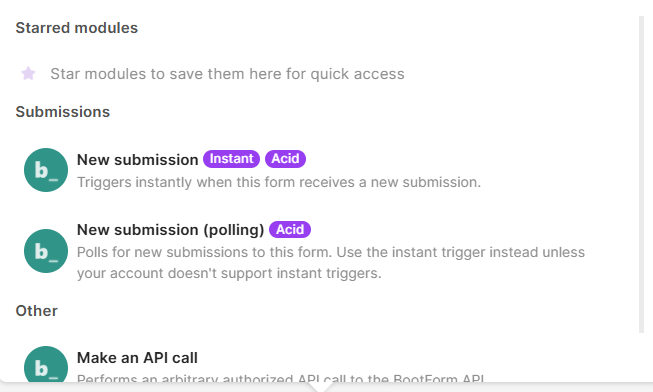
Both triggers output the same bundle, so you can swap one for the other without remapping:
| Item | Example | Notes |
|---|---|---|
| Submission ID | 9a2b3c4d-5e6f-… | Use it in Make an API call to act on this submission |
| Form ID | 11111111-1111-4111-8111-111111111111 | |
| Submitted at | 2026-10-04T06:48:06Z | When BootForm accepted the submission (created_at) |
| Fields | name, email, message, … | One item per field of your form, named after its name= attributes |
| Files | name, url, size, mime | Uploaded files; each url is valid for 1 hour |
Set up the instant trigger
- In Make, create a scenario, click the big + and choose BootForm → New submission.
- Connection: click Add, paste your API key, save. Make checks the key before saving it.
- Webhook: click Create a webhook, pick your form from the Form list and save. This adds a Make destination to that form in BootForm (you'll see it in the form's Workflow tab, with its own delivery log).
- Add the modules that should run for each submission, mapping items from the BootForm bubble.
- Save the scenario and switch it on (Immediately as data arrives).
- Submit your form once. The run shows up in the scenario's History.
Switch the scenario on before testing
While a scenario is off, Make refuses the deliveries (410 Gone). BootForm retries a few times and then marks the delivery failed in the destination's delivery log. Test with the scenario switched on, or click Run once first and submit while it's listening.
Deleting the webhook in Make (or the whole scenario) removes the Make destination from the form again. Removing the destination in BootForm instead leaves Make's webhook waiting for deliveries that never come.
Set up the polling trigger
- Add BootForm → New submission (polling), choose the connection and the Form.
- Maximum number of results caps how many submissions one run processes (1 to 50).
- Choose where to start: From now on skips everything already there; Choose manually lists the last 24 hours of submissions so you can pick the first one to process.
- Save, then switch the scenario on with the schedule you want.
Each run continues from the newest submission the previous run saw. If more arrive between two runs than Maximum number of results allows, raise it or run the scenario more often.
Make an API call
The triggers bring submissions into Make. Make an API call goes the other way: it calls the BootForm API with your saved connection, so the API key never appears in the scenario. Enter the path after https://api.bootform.com, starting with /. After a trigger, build the path from the bundle's Form ID and Submission ID items rather than typing IDs.
| What | Method | URL | Body |
|---|---|---|---|
| Mark the submission read | PATCH | /forms/{Form ID}/submissions/{Submission ID} | {"read": true} |
| Star or archive it | PATCH | same | {"starred": true} or {"archived": true} |
| Approve or reject it (content feed) | PATCH | same | {"moderation_status": "approved"} |
| Delete it | DELETE | same | none |
| Daily counts and delivery stats | GET | /forms/{Form ID}/submissions/stats | none |
| List your forms | GET | /forms | none |
For example, to star each new submission: URL /forms/ + Form ID + /submissions/ + Submission ID (click the items in the picker), method PATCH, body {"starred": true}.
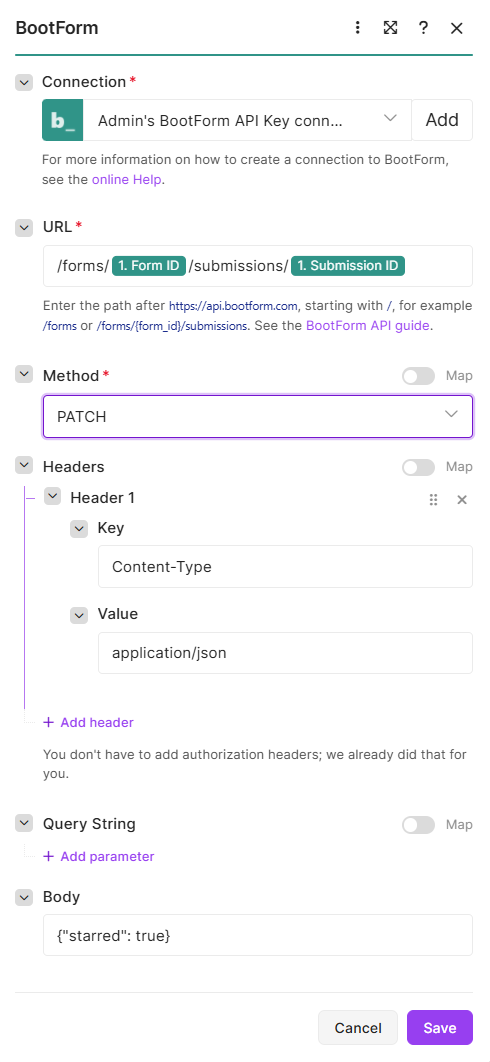
The response comes back as Body, Headers and Status code. For a submission call, Body holds ok and the updated submission. Every endpoint is listed in the API guide.
Scenario ideas
Email a formatted copy. New submission → Email or Gmail Send an email, with the subject built from Fields: name and the body from the other fields and Submitted at.
Collect submissions in a spreadsheet. New submission → Google Sheets Add a row, one column per field. The same works for Airtable or Notion.
File it, then mark it handled. New submission → Google Sheets Add a row → Make an API call PATCH …/submissions/{Submission ID} with {"read": true}. Your dashboard only shows what still needs attention.
Route by content. New submission → Router: if Fields: subject contains "sales", post to your sales Slack channel and star the submission; otherwise create a support ticket.
AI moderation for a content feed. New submission → an AI module that classifies the message → Make an API call PATCH with {"moderation_status": "approved"} or "rejected". Requires moderation to be turned on for the form.
Copy to your CRM, then delete. New submission → HubSpot or Pipedrive Create a contact → Make an API call DELETE …/submissions/{Submission ID}, for when your CRM should be the only copy.
Weekly summary. A scheduled scenario (no trigger module) → Make an API call GET /forms/{form id}/submissions/stats → email yourself the counts.
Troubleshooting
| Symptom | Cause |
|---|---|
| Connection won't save | The API key is wrong or revoked, or the account isn't on Pro or higher |
| Your form is missing from the Form list | The list shows the forms of the account the API key belongs to. Check you used a key from the right account, then click the refresh icon next to the list |
| Submissions arrive in BootForm but the scenario doesn't run | The scenario is off. Check the Make destination's delivery log in BootForm for 410 |
| A file link doesn't open | File URLs expire after 1 hour. Download the file in the same scenario run |
Prefer Zapier? See Notifications & integrations. Want a plain HTTP request to your own server instead? See Webhook setup.